Guide
How to track missing and duplicate football stickers
A practical system for football sticker albums — keep a missing list, count duplicates properly, and turn spares into fair swaps without double-promising.
A big football sticker album can run to several hundred stickers spread across dozens of teams. Somewhere around the halfway mark, every collector hits the same wall: packs keep producing stickers you already have, the missing ones get rarer, and you can no longer remember what you need.
The fix isn’t luck. It’s keeping two accurate lists — what’s missing and what’s spare — and using them every time you open a pack or meet someone to swap. This guide shows you how, whether you use paper, a spreadsheet or an app.
Start with the album’s numbering
Before you track anything, look at how your album numbers its stickers. Football albums usually use one of two schemes:
- Plain numbers, from 1 to the last sticker.
- Team codes plus a number, such as a three-letter team code followed by 1–20, with extra sections for stadiums, legends or specials.
Write your list using exactly the codes printed on the back of the stickers. If you shorten or reorder them, you’ll make mistakes when comparing lists with someone else, because their list will use the printed codes.
Tip: note the sections as you go — teams, intro pages, specials. Progress per section tells you which pages are nearly finished, which is far more motivating than a single overall number.
Keep a missing list, not a “have” list
It sounds backwards, but once you’re past the first few packs, the list you actually use is the missing list. It’s shorter, it’s what you show to swap partners, and it shrinks as you go.
A good missing list is:
- Sorted in album order, so you can scan it quickly against someone’s spares.
- Updated straight after opening packs — not at the end of the week.
- Easy to share: as a printout, a message, or a code another app can read.
Count duplicates — don’t just flag them
“I have that one spare” isn’t enough. Keep a count for each duplicate (×2, ×3…). Counts matter because:
- You can offer the stickers you have most of first.
- You know when a sticker is safe to give away versus your last spare.
- You spot patterns: if you have five of the same player, that sticker is common and a weak bargaining chip.
Store your duplicates physically in album order too — a small box with dividers by team works well — so finding a sticker during a swap takes seconds.
Open packs in a routine
A simple routine prevents most errors:
- Open all your packs.
- Sort the stickers into album order.
- For each one: if it’s missing, stick it in and remove it from the missing list; if not, add one to its duplicate count.
- Put the duplicates in their box in order.
Doing the marking before sticking anything in means you never lose track of a sticker that was “just there a minute ago”.
Turn duplicates into fair swaps
When you meet someone to swap, compare your spares against their missing list and their spares against yours. The overlap in both directions is your possible trade.
Some practical rules collectors use:
- One for one is the usual default between friends. Agree beforehand if special or shiny stickers count for more.
- Give your highest-count duplicates first.
- Reserve before you promise. If someone asks you to keep a sticker for them, mark it as reserved straight away so you don’t offer it to someone else at school the next day.
- Swap with people you know, especially for children: family, classmates, a club. It keeps swaps fair and safe.
Doing it on paper or in a spreadsheet
Paper works for small albums: print the checklist, tick what you have and write a small number next to duplicates. It falls apart when the counts change daily.
A spreadsheet is the next step. Use one row per sticker with columns for the code, the team/section, whether you own it and how many duplicates you have. Filters then give you the missing list and the duplicates list. The weak spot is comparing with a friend — you’ll be reading two lists side by side. See Collectors Den vs. spreadsheets for a fuller comparison.
Doing it in Collectors Den
Collectors Den is built around exactly this routine:
- Set up the album by its pages and stickers per page (the numbering is generated), or import a CSV with columns like
number,name,team(orsection),ownedandduplicates. Numbers can be codes, not only digits. - Mark stickers as you open packs; the album shows what’s missing and keeps a count of each duplicate.
- Scan the back: point the camera at the number on the back of a sticker and the app tells you whether you already have it. The reading happens on the device.
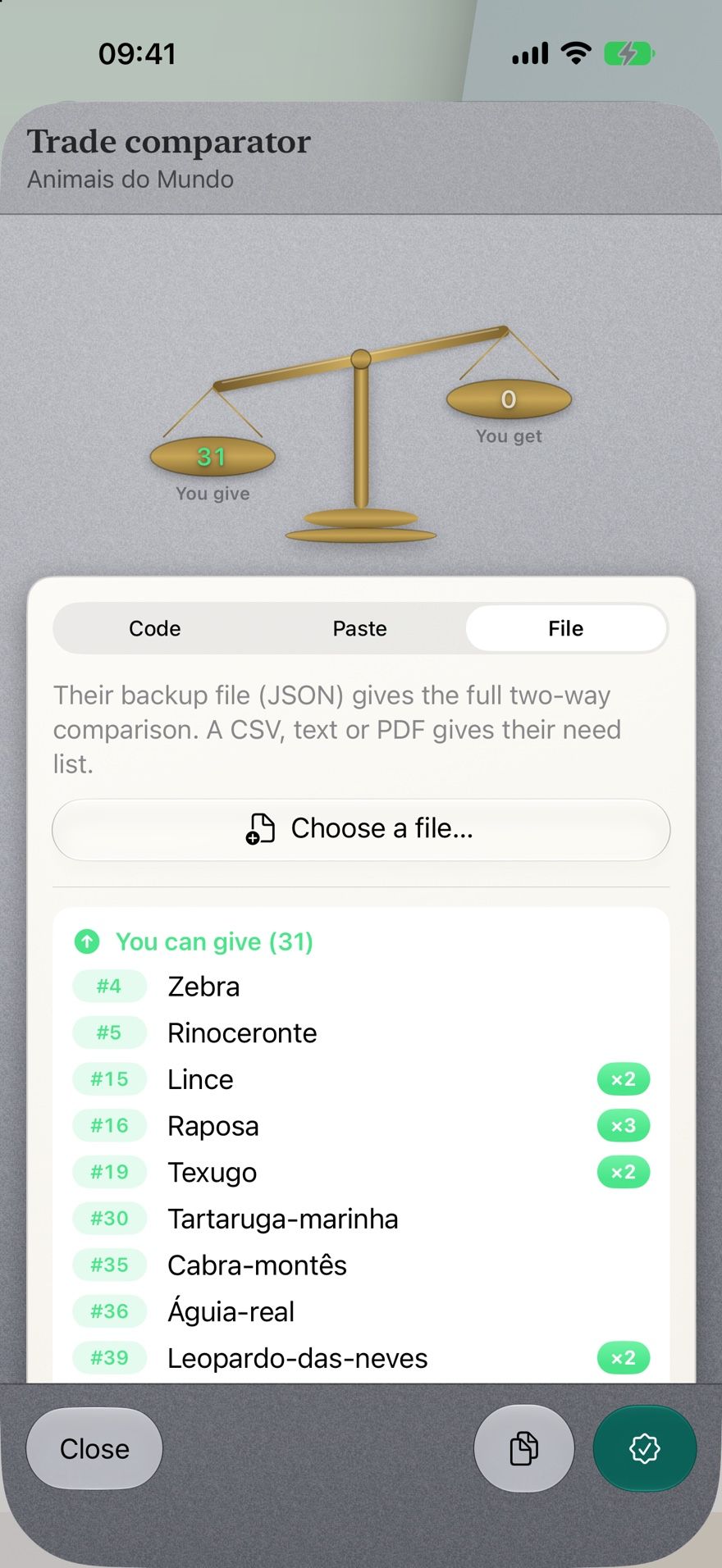
- Compare lists in the trade comparator, loading a friend’s list from a code (a QR code works face to face with no internet), pasted text or a file. It shows what you can give and what you can get.
- Reserve a duplicate for the person who asked.
- Print the missing list as a PDF if your swap partner prefers paper.
What it doesn’t do: it doesn’t ship the checklist of a specific published album, and it doesn’t match you with strangers — swaps stay between people you know. Nothing is bought or sold in the app.
A quick checklist
- Use the codes printed on the stickers.
- Keep a missing list in album order.
- Count duplicates, don’t just flag them.
- Mark before you stick.
- Reserve before you promise.
- Compare both directions when you swap.